Getting started, step by step.
Install the plugin, connect your Apify account once, then ask in plain words. It costs nothing to install.
Takes about 3 minutes
- YouAsk in plain words: “Is a heated eye mask worth selling?”
- Claude, with MarketMagePicks the research and asks before anything paid
- Your Apify accountRuns the research tools, billed to you at published prices
- Back in ClaudeThe verdict, the evidence and your one next move
Before you start
Two accounts. Claude, and a free Apify one.
Any Claude plan
Free included, in claude.ai, the desktop app and Claude Code. Only the scheduled Monday briefing needs a paid plan. On Team and Enterprise, an owner can install plugins for everyone; each person connects their own Apify.
A free Apify account
Where the research runs. The free plan includes $5 of credit every month, about 30 idea checks, and needs no credit card. Create one at apify.com, or during step 2. What is Apify?
Good to know
What is Apify, and why do I need it?
Apify is the cloud platform where MarketMage's research tools run. They are CleanPull's data tools, published on the Apify Store.
- Your own account. Runs bill to you at the prices on each tool's Store page. There's no MarketMage subscription, and we never bill you ourselves.
- Your data stays yours. Results and saved watches live in your Apify account, under your control.
- Free to start. Apify's free plan includes $5 of credit a month and needs no card. That covers about 30 idea checks.
- One sign-in. You connect it once in step 2. What MarketMage can and can't do there.
Step 1
Install the plugin.
The quickest way: download MarketMage (.zip), then in Customize → Plugins click Add, choose Upload plugin and pick the file. Every method, with screenshots, is on the download page.
Or add it from GitHub, on claude.ai or in the Claude desktop app. One action per step; each opens a new screen.
-
Open Customize in the left sidebar, then the Plugins tab. On the web, this link goes straight there: claude.ai/customize/plugins.
-
Click Add at the top right. A small menu opens: choose Add marketplace, the first item.
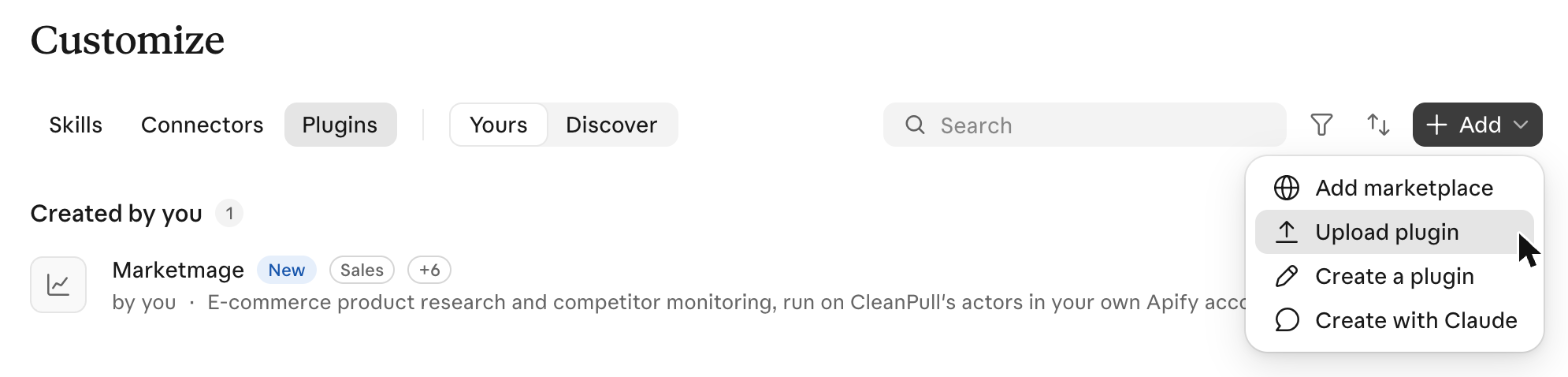
Add marketplace is the first item. Upload plugin, below it, is for the .zip file. -
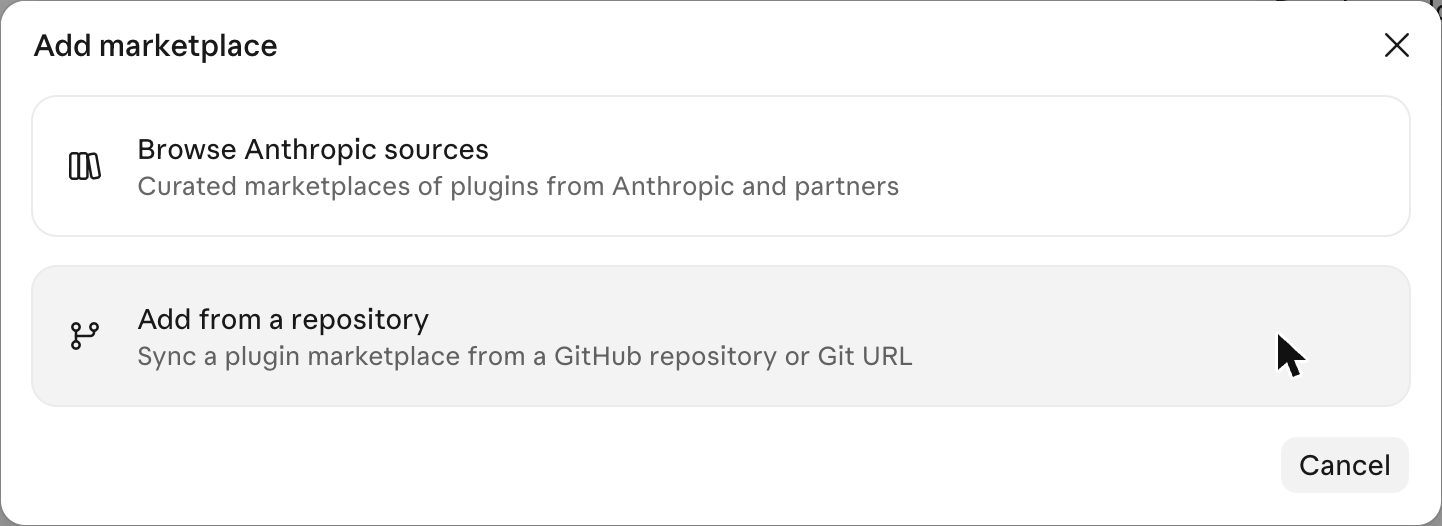
An Add marketplace window opens with two cards. Choose Add from a repository.
-
In the URL box, type
MarketMage/plugin, then choose Use "MarketMage/plugin" in the list that opens.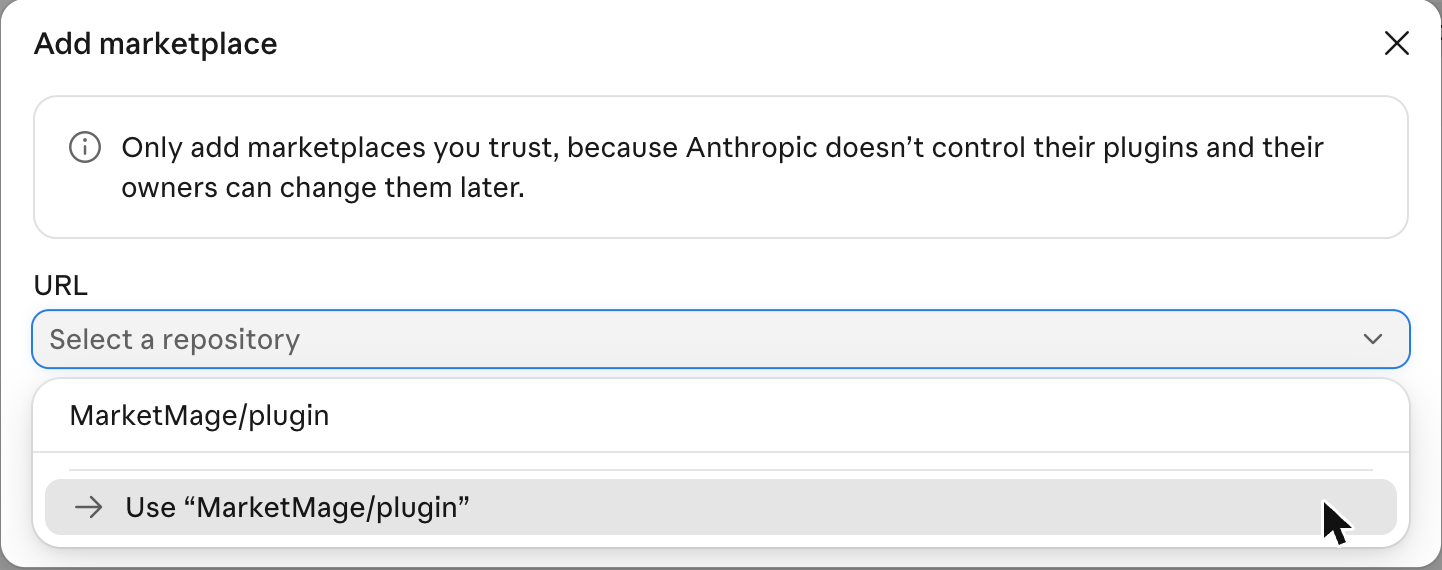
-
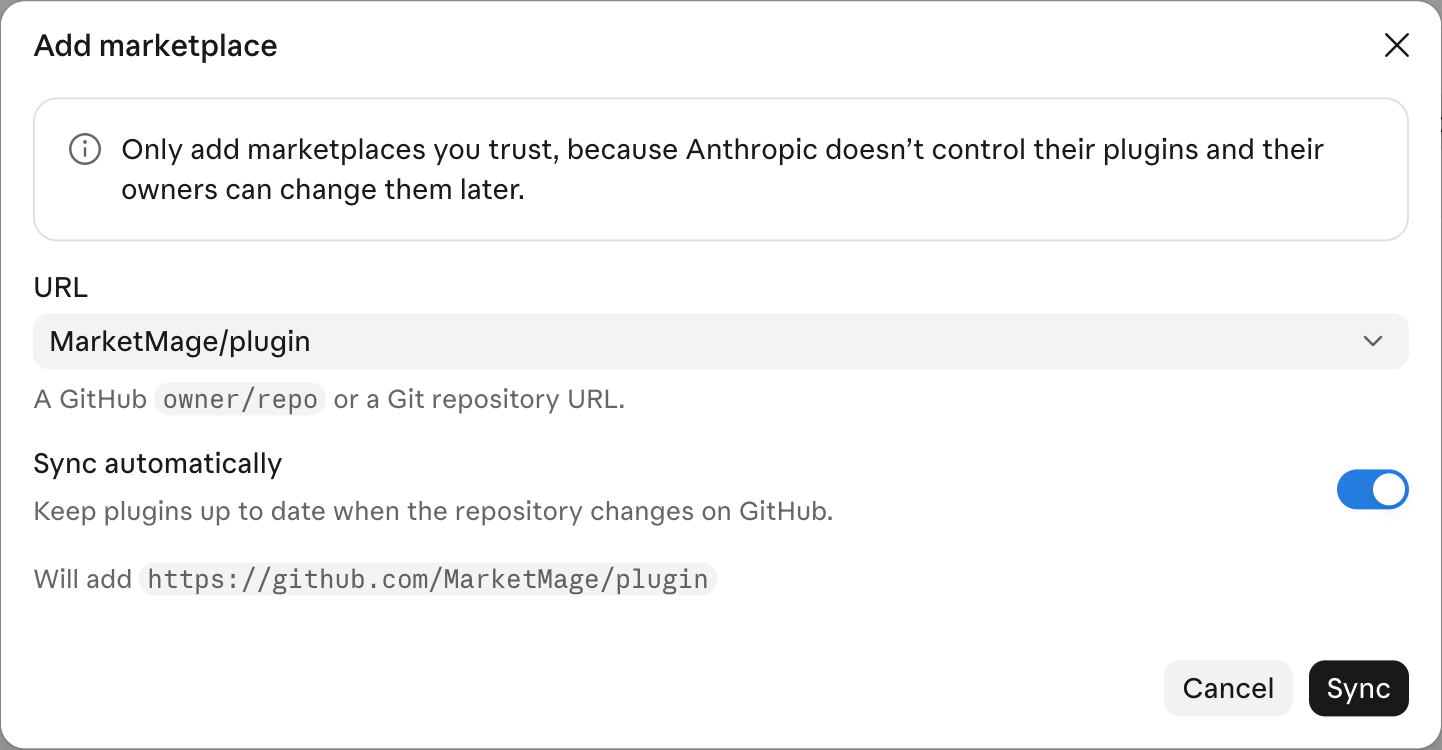
Click Sync. A note may offer to grant the Claude GitHub App access. You can skip it: granting it only makes updates sync automatically. Without it, update from Add → Manage marketplaces, the MarketMage menu, Check for updates.
-
MarketMage appears on the Plugins page: click Add on its row. By adding it, you agree to the Terms and the Acceptable Use Policy.

In Claude Code: type /plugin marketplace add MarketMage/plugin, then /plugin install marketmage@marketmage. If you already added MarketMage on claude.ai, it reaches Claude Code by itself the next time you start it, signed in to the same account.
Add it once on claude.ai and it's in the desktop app and Claude Code too. An uploaded .zip doesn't update itself: upload a newer file the same way, and your Apify connection is kept. Once MarketMage is in Claude's plugin directory, you'll also find it under Customize → Plugins → Discover (the directory shows on paid Claude plans).
Step 2
Connect Apify, once.
On claude.ai or the desktop app:
- In Customize → Plugins, open MarketMage, go to its Connectors tab and click Connect next to apify.
- Claude shows an "Add custom connector" notice with the details filled in. Check it says Connects to mcp.apify.com and click Continue.
- On the settings page that follows, leave everything as it is and click Add at the bottom.
- Back on the same Connectors tab, click Connect next to apify again, then sign in to Apify or create a free account, and approve. (Already signed in to Apify in that browser? It may connect at once.) It is the only sign-in MarketMage needs.
- Optional, fewer approval boxes: claude.ai asks before each Apify tool call until you change it. In Customize → Connectors → apify → Tool permissions, set Read-only tools and Write/delete tools to Always allow (with screenshots). Paid runs still wait for your yes in the chat, and every run has a spending limit.
In Claude Code: type /mcp, choose apify and sign in to Apify. Every step with screenshots: the download page.
You do this once for your Claude account. What MarketMage can and can't do in your Apify account.
No account? Create a free one here.
Step 3
Send your first message.
In a new chat, type /marketmage:start, or ask “What can MarketMage do?”
- Claude welcomes you with seven things you can ask, each with an example you can copy as it is, and one tip: “Ask me to check or look up anything and I’ll read it live.”
- Then one question: “What brings you here?” If you like, add how you sell (dropship, Amazon, Etsy, your own store) and roughly your budget, and every answer is tailored to you. It’s optional.
- Your answer goes to the right job. An Amazon seller who wants their ranks goes straight to rank tracking; someone who wants something to sell gets a guided session in a niche they like: ideas selling now, the two best checked for the market and for you, and one better version.
- Nothing paid runs from the welcome. The guided session gives one estimate when you name a niche, about $0.55 for most sellers and about $0.64 if you dropship through ads (Claude gives the free-plan figure too where it differs), and waits for your yes. One yes covers the three steps, and each run has a spending limit a little above its estimate.
/marketmage:start
Welcome, glad you’re here. MarketMage is live marketplace research for sellers: let’s find what’s worth your time.
Find something to sell: “Find me something to sell in home fitness”
Check an idea or a claim: “Check if heated eye masks are worth selling”
Size up a competitor: “Look at gymshark.com: what sells, what’s on sale, what ads they run”
… and four more.
Ask me to check or look up anything and I’ll read it live.
What brings you here?
Step 4
The seven jobs, in your words.
The same seven the welcome shows. Ask in your own words; these are only examples.
- Find something to sell
Find me something to sell in home fitness.
More - Check an idea or a claim
Someone says pet hair removers sell 500 a day: check it.
More - Size up a competitor’s store and their ads
Look at gymshark.com: what sells, what’s on sale, what ads they run.
More - Sourcing and supplier prices
Check what bamboo bath caddies cost from factories.
More - What buyers complain about
What do buyers complain about in the top dog car seats?
More - Watch prices, stock, ranks, ads or promotions
Watch this listing’s price and stock and tell me what changes.
More - Already selling on Amazon
Track my rank for ‘yoga mat’.
More
Back again? “Where were we?” picks up where you left off when the notebook is on, and “Catch me up” gives your briefing. Everything else you can ask: what you can ask.
If something goes wrong
Most fixes are quick.
Still stuck? The troubleshooting page has more, and support answers within one business day.
Connect is greyed out
On a Team plan, only an owner can add the Apify connection; ask them to add it once for everyone. Otherwise, try Claude in a web browser at claude.ai.
Claude says “Apify isn’t connected”
Open MarketMage in your plugins, go to its Connectors tab and connect again, then sign in to Apify.
Claude answered from a web search
Ask it as a check: “Can you check what silicone baking mats cost on Alibaba?” rather than “What do they go for?”. On claude.ai a general question can go to web search; “check” or “look up” reads it live with MarketMage.
Claude asks before every tool call
That’s claude.ai’s approval box. Set Read-only tools and Write/delete tools to Always allow in Customize → Connectors → apify → Tool permissions. Paid runs still wait for your yes in the chat.
You use Claude Code
Install with /plugin marketplace add MarketMage/plugin, then /plugin install marketmage@marketmage (step 1). To connect Apify, type /mcp, choose apify and sign in to Apify.
Costs nothing to install. Ask your first question.
Add it to Claude today in a few clicks. Once it's in Claude's plugin directory, you'll also find it there.